
You Already Have Everything You Need to Make Reels
If you’ve been wondering how to make reels with existing video, here’s the short answer: open Instagram, tap the “+” button, select “Reel,” choose clips from your camera roll, trim them, add music or captions, and post. No new filming required.
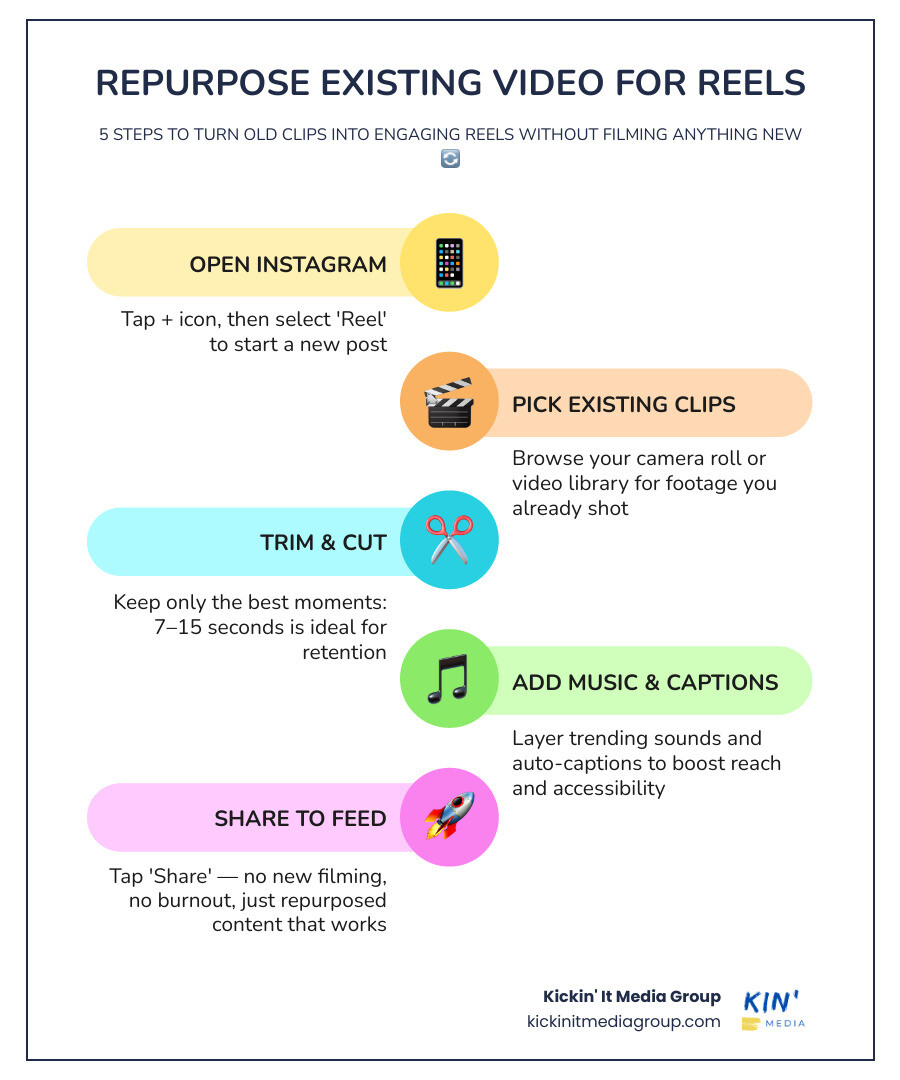
Here’s how it works in 5 simple steps:
- Open Instagram and tap the “+” icon, then select “Reel”
- Tap the gallery icon in the lower-left corner to browse your existing videos
- Select and trim your clips to keep only the best moments
- Add music, captions, or text using Instagram’s built-in tools
- Tap “Share” to publish your Reel to your feed
You don’t need to create anything new. You just need to use what you already have.
Here’s something most small business owners don’t realize: the videos sitting on your phone right now, the behind-the-scenes clips, the product demos, the quick how-tos, are already Reel material. You just haven’t packaged them yet.
Creating brand-new content every single day is exhausting. It’s one of the fastest ways to burn out and go quiet online, which is the worst thing you can do for your brand’s visibility. The smarter move is to repurpose what you’ve already filmed.
Instagram Reels get 2.25 times more reach than standard photos, and the average user spends 35% of their time on Instagram watching them. That means your existing footage has real potential, it just needs a little formatting and a few finishing touches.
I’m Ashley Stone, founder of Kickin’ It Media Group, and helping small businesses in the Keller and Fort Worth area get more mileage out of their video content (including mastering how to make reels with existing video) is exactly what we do. In this guide, I’ll walk you through the whole process in plain, simple steps so you can start posting without the overwhelm.
Why Repurposing Video for Reels Is a Game Changer
We have all been there. You sit down on a Monday morning with a long list of marketing tasks, staring at a blank screen, trying to think of something clever to film. Trying to cook up brand-new video content every single day is a surefire path to burnout. It is unsustainable, expensive, and completely unnecessary when you already have a goldmine of content just waiting to be tapped.
By taking your existing video library and turning those clips into Reels, you are practicing smart content reuse. Think of it as distribution engineering. You record one high-quality video, like a local workshop in Southlake, a client project in Trophy Club, or a quick tutorial in Roanoke, and you slice it into multiple bite-sized clips. This approach saves you hours of filming time and lets you maintain a highly consistent posting schedule without starting from scratch.
The math behind this strategy is incredibly in your favor:
- Massive Organic Reach: The Instagram algorithm actively favors short-form video. Reels pull more than twice the reach of standard feed images on average, giving you a direct line to non-followers.
- Algorithmic Projections: The algorithm is heavily pushing this format. In fact, projections show that the algorithm will fill about 38.5% of a user’s feed with Reels.
- High Viewer Engagement: The average engagement rate for Reels sits around 1.23%, which consistently outperforms standard photo posts. An average Reel pulls in around 16,153 views and gets 28 saves, blowing traditional posts out of the water.
- Daily Attention: Daily views are hitting a staggering 200 billion across Instagram and Facebook. With Facebook generating around 140 billion Reel plays per day and over 600 million daily viewers, the potential audience is massive.
Repurposing is not just about saving time, it is about getting the absolute most mileage out of the hard work you have already put into creating valuable content. If you are looking for fresh inspiration on what kind of raw footage you can use, check out our list of 10 Video Content Ideas You’ll Love to spark your next batch of social posts.
How to Make Reels with Existing Video: The Step-by-Step Process
You do not need to be a professional video editor to master how to make reels with existing video. The entire process comes down to smart video selection, clean trimming, and correct formatting. Let us break down the standard editing timeline so you can visualize how simple it is to stitch your clips together.
When you are ready to start editing, you can follow this comprehensive How To Edit Videos For Instagram Reels: A Step-By-Step Guide — SocialRevver Blog to understand the technical details of adjusting your timeline. Let us walk through the exact steps to locate your best footage and format it beautifully.
Step 1: Sifting Your Library and Learning How to Make Reels with Existing Video
Your first task is to audit your existing video archive. You do not need cinematic masterpieces, you just need clear, helpful, or entertaining moments. Scan through your camera roll, your cloud storage, or your past recordings to look for:
- Webinars and Presentations: A one-hour educational webinar can be systematically broken down into approximately ten distinct, high-value Reels.
- Customer Testimonials: Quick video reviews or client interviews where someone shares an “aha” moment or praises your business.
- Demos and Tutorials: Close-up shots of hands working, products being packaged, or a specific technique being demonstrated. For example, a local chef pulling a ten-second knife technique snippet from a long cooking tutorial.
- Bloopers and Outtakes: Authentic, funny behind-the-scenes moments. Since 50% of users say they prefer funny content, showing your human side can really pay off.
If you have recorded internal training videos, those can also be an absolute goldmine. Read our article on 5 Reasons Business Training Videos Are a Game-Changer to see how your internal assets can easily double as highly engaging public-facing social media content.
Step 2: Formatting and Mastering How to Make Reels with Existing Video
Once you have chosen your raw clips, you must format them to fit the mobile screen. Instagram Reels require a vertical format with a 9:16 aspect ratio (specifically 1080 x 1920 pixels).
If your original video was filmed horizontally (16:9), you have two main choices to make it look great:
- Crop and Zoom: Crop the horizontal frame to a vertical 9:16 ratio. Ensure your main subject is centered so you do not lose important details. If the subject moves around, you can use keyframes in your editing software to smoothly pan and follow the action.
- Letterboxing with a Styled Background: Place your horizontal video in the center of a vertical 9:16 canvas. This leaves empty space above and below the video, which is actually prime real estate. You can use this extra space to write a bold, attention-grabbing headline or place auto-captions where they are easy to read.
To avoid blurry, pixelated uploads, always export your final video in 1080p HD resolution with a frame rate of 30 FPS (Frames Per Second) or higher. If you want to make sure your raw footage looks crisp before you even start editing, take a look at our guide on how to Achieve Studio Quality Results with Simplified Video Setup to elevate your recording process.
The Best Tools for Editing Existing Videos into Reels
You do not need expensive desktop software to edit your videos. There are several incredible, beginner-friendly tools available that make the process of turning existing footage into polished Reels incredibly fast.
| Editing Tool | Best For | Key Features | Skill Level |
|---|---|---|---|
| Instagram Native Editor | Quick, on-the-go edits | Native templates, direct access to trending audio library, interactive stickers | Beginner |
| CapCut | Advanced mobile editing | “Long video to shorts” auto-clipping, speech-to-text captions, keyframe animations | Intermediate |
| Revid.ai | Automated AI repurposing | AI-driven video cropping, automatic subtitle generation, fast highlight detection | Beginner |
| DaVinci Resolve | Professional desktop polishing | Advanced color grading, precise audio mixing, professional multi-track timeline | Advanced |
If you are using Instagram’s native editor, using built-in templates is one of the easiest and quickest ways to batch-process existing camera roll photos and videos into a cohesive Reel. Templates allow you to pre-match your own media to the exact timing, transitions, and music of an existing successful Reel.
For those who want to save time and ensure their videos look incredibly professional, outsourcing your editing can yield massive results. Learn how you can Get 30+ More Views with High-Quality Video Editing Services to let professionals handle the cropping, pacing, and polishing for you.
Polishing Your Reels for Maximum Engagement
An edited video is only halfway there. To truly capture attention and stop users from swiping away, you need to add the final polish.
First, you must optimize your video for silent viewers. A massive 85% of social media users watch videos with the sound turned off. If you do not include captions, you are immediately losing a huge portion of your potential audience. Use auto-captions to generate text overlays, and style them with bold, high-contrast, sans-serif fonts that are easy to read on small screens.
Second, you must keep your text within the safe zones of the screen. If you place your text too high, too low, or too close to the edges, it will be covered up by Instagram’s user interface elements, such as your username, the caption, or the interaction buttons on the right side of the screen.
To learn more about safe zones and how to design your visual layers, read this helpful guide on How to make a Reel on Instagram in 2026 | Maeve Social Editorial .
Additionally, always tap into trending music. Using trending audio is one of the fastest ways to make your repurposed video feel native and relevant. You can easily spot a trending track on Instagram by looking for the small, upward-facing arrow next to the audio name at the bottom of a Reel. If you are editing a talking-head video, keep your voiceover as the loudest element and set your background music volume to roughly 20% to 30% of your speech volume.
Common Mistakes to Avoid When Reusing Video Clips
Repurposing is highly effective, but there are a few common mistakes that can quietly kill your distribution and reach:
- Leaving Platform Watermarks: If you are downloading your own videos from TikTok to post on Reels, avoid visible watermarks. The Instagram algorithm actively penalizes recycled content with watermarks, knocking its distribution down by 40 to 60 percent. Always export from your original, clean recording files instead of using third-party watermark removers. To learn more about cross-platform strategies, read this guide on Repurposing TikToks to Reels and Shorts: Complete Guide 2026 .
- Using Copyrighted Music in Raw Files: Uploading a video with copyrighted music embedded in the file can cause your Reel to be muted or completely taken down. Strip the original music and layer licensed tracks directly from Instagram’s native library.
- Ignoring the First 3 Seconds: The depressing fact is that around half of viewers swipe past your video within the first three seconds. Avoid slow introductions, logo animations, or starting with “hey guys.” Open immediately with a powerful hook, a bold statement, or a compelling visual promise.
- Over-polishing Your Edits: Polished, sales-heavy content that looks like a traditional commercial often performs worse than raw, authentic footage that feels like it was made by a real person. Keep it human and genuine.
If you want to expand your video marketing to other platforms, check out our guide on Creative Video Ideas for TikTok to Boost Your Engagement Overnight to keep your content fresh and highly engaging across all channels.
Frequently Asked Questions about Making Reels
What is the best length for a repurposed Reel?
While Instagram allows Reels to be up to 90 seconds long, the absolute sweet spot for grabbing and holding attention is between 7 and 15 seconds. Shorter, punchier videos encourage repeat views, which signals high quality to the algorithm and boosts your reach. If you are sharing a step-by-step tutorial, keep it under 30 to 60 seconds to maintain high viewer retention.
Can I use horizontal videos for Reels?
Yes, you can absolutely use horizontal videos. As mentioned earlier, you can either crop the video to a vertical 9:16 aspect ratio (keeping your subject centered) or place it in the center of a vertical canvas. If you choose to crop, you can use keyframes in your editor to smoothly track any movement. If you place it in the center, use the black space at the top and bottom to add bold headlines and captions. For more details on how to format your video files, check out this guide on How to Make Reels with Existing Videos Quickly & Easily .
How does the algorithm treat uploaded videos?
The algorithm prefers original, platform-native content. However, you can easily make your uploaded videos read as native by layering on Instagram’s native elements, such as typing your text overlays within the app, using Instagram’s native auto-captions, or adding background music directly from the Instagram audio library. If you are also publishing on Facebook, you can read this step-by-step guide on How to Make a Reel on Facebook: A Step-by-Step Guide to see how the Facebook recommendation engine pushes Reels to non-followers.
Conclusion
Mastering how to make reels with existing video is the ultimate shortcut to growing your online presence. You do not need to spend hours filming new content every single week, nor do you need to buy expensive gear. By digging into your camera roll, sifting through your webinars, and polishing your clips with trending audio and captions, you can build a highly consistent social media presence that gets results.
To make sure you are getting the absolute best results from your social media videos, read this step-by-step guide on How to Make Reels With Existing Video: Easy Step-by-Step Guide for even more advanced tips on organizing your video archive.
At Kickin’ It Media Group, we specialize in helping local small businesses in Keller, Southlake, Roanoke, and across the DFW area tell their stories through high-quality video, photography, and smart digital marketing. Whether you need professional video editing to turn your raw footage into high-performing social clips, custom creative direction, or a complete social media strategy, we are here to help.
Explore our professional Video Photography Services to see how we can take the stress out of content creation and help your business show up consistently online. Let us do the heavy lifting so you can focus on running your business.